Compliance & Payroll Updates - December 15th, 2025
Hey DSPTCH users! 🎉 We've been working hard to bring you some fantastic improvements to make managing compliance and payroll even easier. This release packs a lot of powerful features that will streamline your workflows and give you better visibility into your projects. Let's dive in!
💰 Gusto Payroll Integration
We're excited to announce our new Gusto payroll integration! If you're using Gusto for payroll processing, DSPTCH now automatically detects your Gusto connection through Finch and provides a specialized export format tailored specifically for Gusto's requirements.
What's New:
- Smart Export Detection: DSPTCH automatically detects when you're connected to Gusto via Finch
- Optimized Format: Export time cards in the exact format Gusto expects
- Seamless Integration: No manual configuration needed - it just works!
- Backwards Compatible: Existing export workflows remain unchanged
This feature makes payroll processing with Gusto incredibly smooth - just export your time cards and import directly into Gusto without any formatting hassles!
📋 Smart Compliance Check Assignment
Managing compliance just got a lot smarter! We've introduced automatic assignment of compliance checks to the right people on your team.
How It Works:
- Project Manager Auto-Assignment: Compliance checks for projects are automatically assigned to project managers
- Smart Logic: The system identifies the most appropriate assignee based on project roles
- Manual Override: You can still manually assign checks if needed
- No More Lost Tasks: Every compliance check now has a clear owner from day one
This means compliance checks won't slip through the cracks anymore - they'll automatically land in the right person's task list!
🎯 Enhanced PWA Penalties Dashboard
We've given the PWA penalties section a major upgrade with better organization, clearer information, and improved performance.
Performance Improvements:
- Faster Loading: PWA penalties pages now load significantly faster with smart lazy loading
- Better Responsiveness: Reduced wait times when navigating penalty data
Clearer Penalty Information:
- Warning Indicators: Visual alerts when viewing employer-filtered penalty data
- Advisory Tooltips: Clear explanations for advisory amounts vs. actual penalties
- Improved Layout: Better organization of penalty cards for easier scanning
- Color-Coded Amounts: Yellow for advisory amounts, red for actual penalties
✅ Better Compliance Check Management
We've made several improvements to help you stay on top of compliance requirements more effectively.
Priority Visibility:
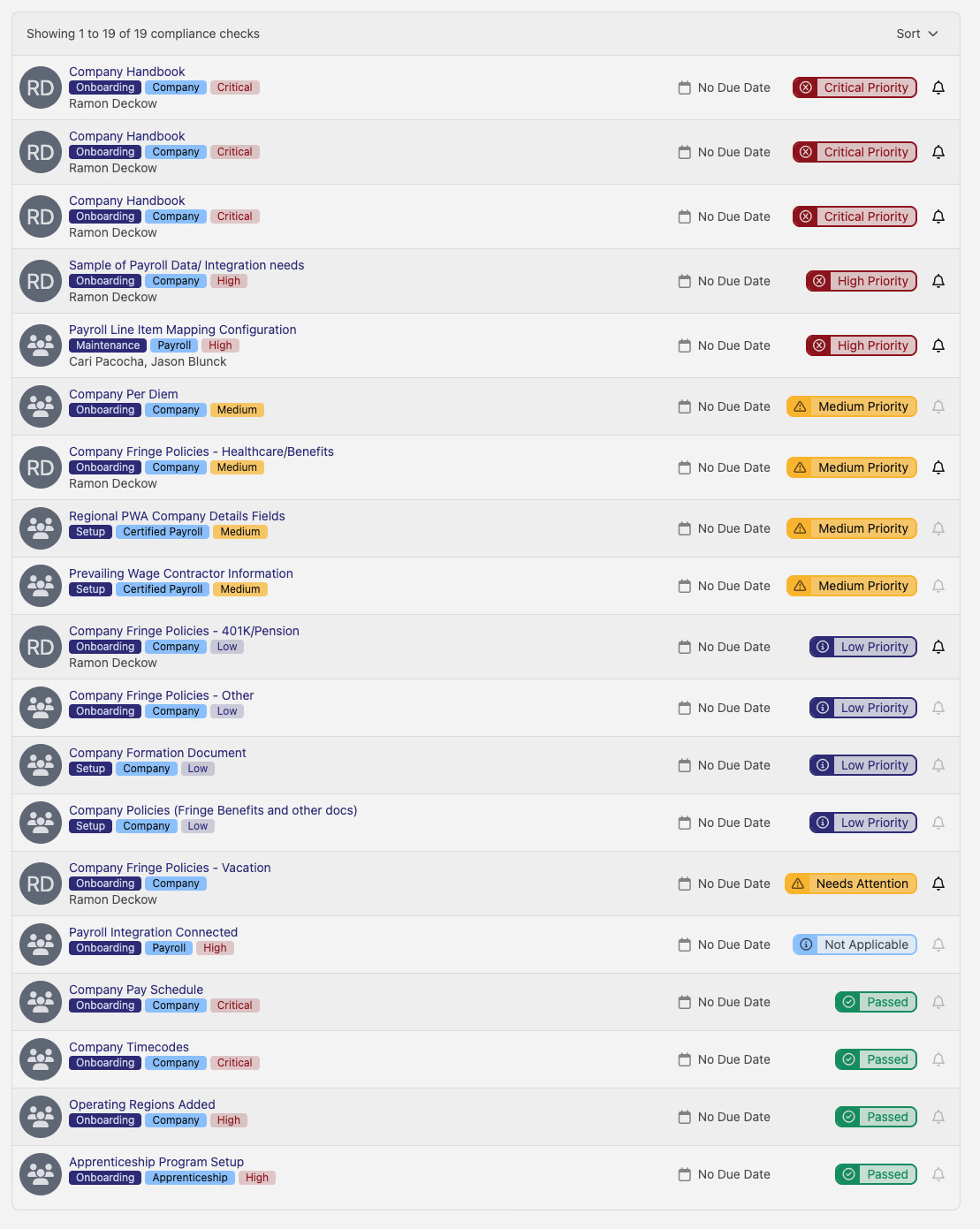
- Priority Badges: Compliance checks now display clear priority levels (Critical, High, Medium, Low)
- Color-Coded System: Easy visual scanning to identify urgent items
- Smart Filtering: Onboarding banners focus on high and critical priority items only
Onboarding Assistance:
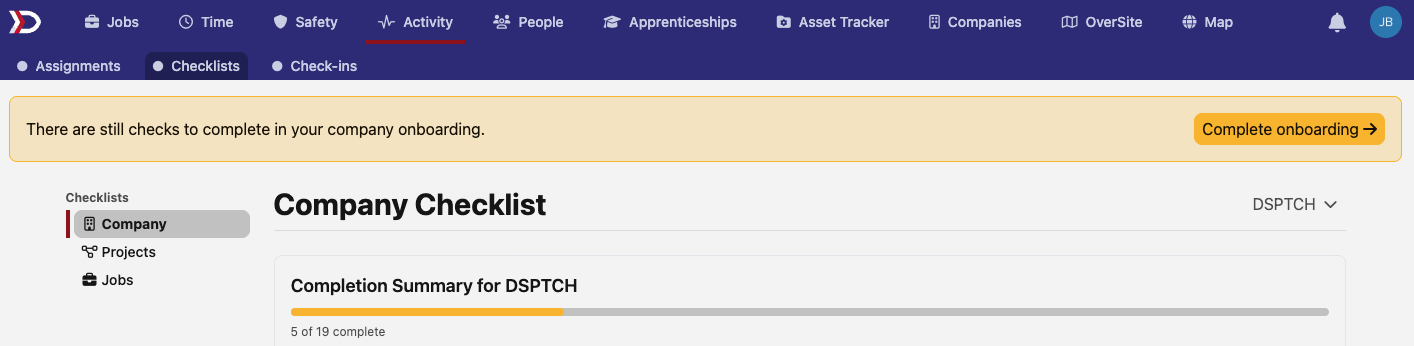
- Smart Banners: Helpful notifications when companies have incomplete onboarding
- Focused Alerts: Only shows banners for high and critical priority compliance gaps
- Direct Navigation: Click to jump straight to the compliance page
🎨 User Interface Polish
We've made lots of small but meaningful improvements to make your daily workflows smoother:
Advisory Amount Clarity:
- Helpful Tooltips: Hover over advisory amounts in projects subsidiary views to understand what they mean
- Better Color Coding: Yellow for advisory amounts, clear distinction from actual penalties
- Context Explanations: Tooltips explain that actual penalties are calculated differently
Getting Help
As always, if you have questions about any of these new features or need help getting started:
- Check our help center for detailed guides
- Contact support - our team is here to help
Thanks for being part of the DSPTCH community!
Questions or feedback? Reach out to our support team or visit our help center for more information.