New Features & Improvements - June 20th, 2025
Hey team! We've been working hard to bring you some game-changing updates. This release is packed with features that'll make your day-to-day smoother and more efficient. Let's dive in! 🏊♂️
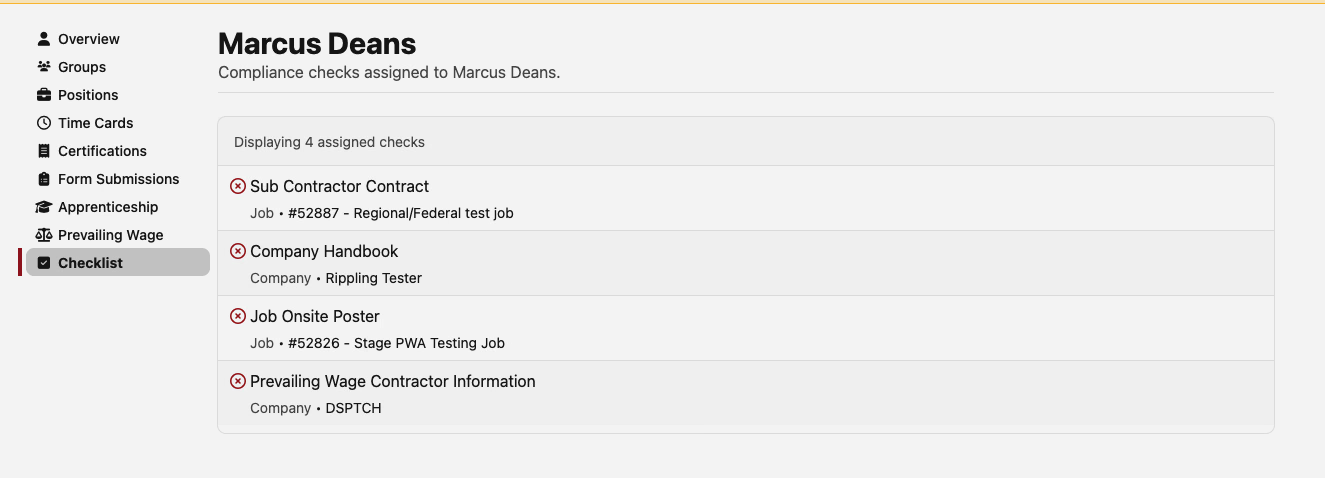
✅ Compliance Checks Improvement
Managing your compliance tasks just got way easier! We've added a dedicated Checklist tab to user profiles where you can:
- View all your assigned compliance checks in one place
- Track due dates and completion status
- See check details and requirements at a glance
- Stay on top of your compliance responsibilities
No more hunting through different screens - everything you need is right there in your profile!
📋 Enhanced Compliance Tracking
We've upgraded the compliance check history to provide more detailed insights:
- See who was assigned: Track changes to check assignees over time
- Due date modifications: Monitor when and why due dates were adjusted
- Complete audit trail: Every change is now properly logged and displayed
💰 Fringe Benefit Plans Management
Introducing a new way to manage your fringe benefit plans! Located in Time → Settings under the Company tab, you can now:
- Create and edit fringe benefit plans with unique plan numbers
- Track plan names, types, and funding status
- Prepare for updated WH-347 requirements
- Manage all your benefit plans in one centralized location
⏰ Time Management Improvements
Time Card Locking Now Available to All
What was previously in beta is now available to everyone! Lock time cards to prevent accidental changes after approval.
Bulk Time Entry Creation
Speed up time entry with our bulk creation tool - now available to all users without needing special access.
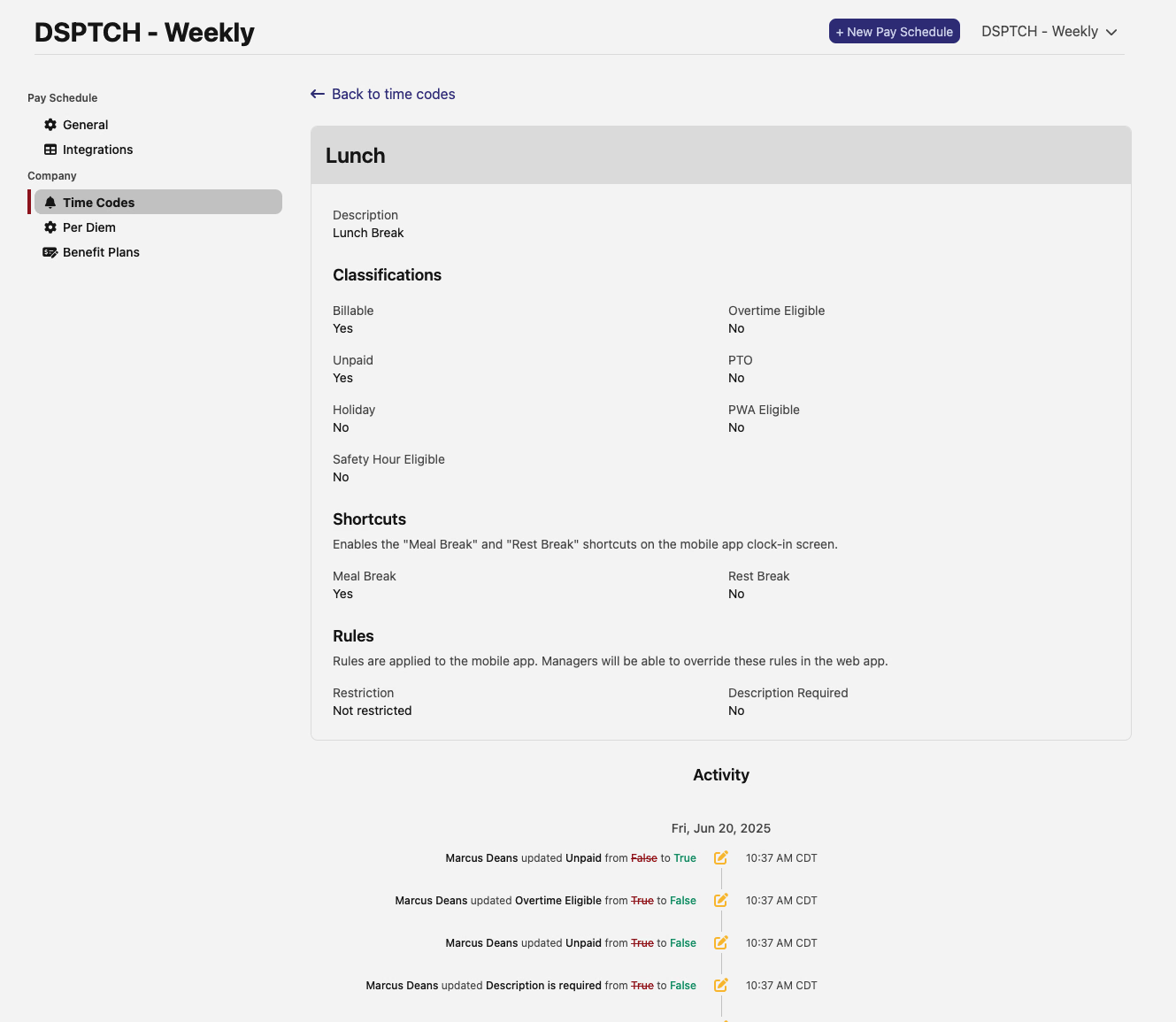
New Timecode Timeline View
We've added a full visualization of timecode details to see all of the configuration details, including a timeline visualization that shows:
- Clear visual representation of timecode schedules
- All relevant attributes in an easy-to-scan format
- Improved navigation between related timecodes
Time Entry Overtime
Overtime hours now display directly on individual time entries for easier visualization and tracking. No more guessing about which entries are overtime!
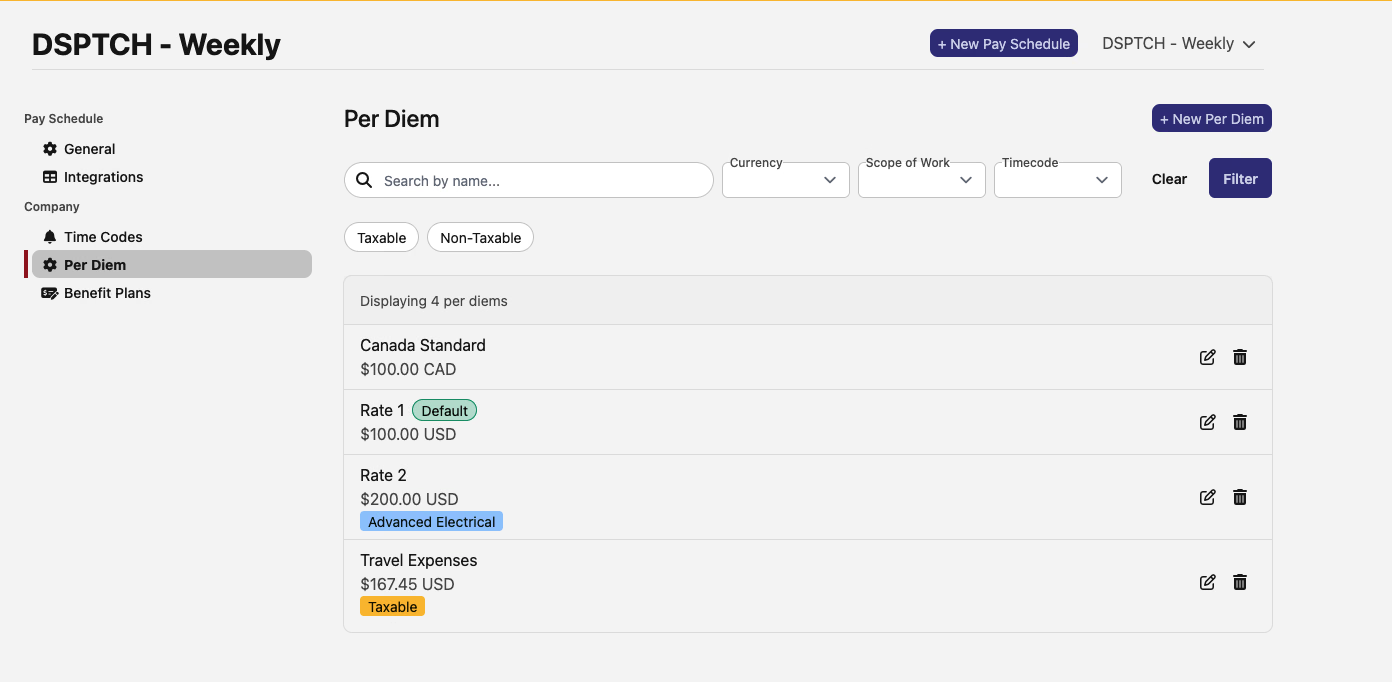
💰 Per Diem Management Upgrades
Managing per diems is now more intuitive with new filtering options:
- Quick filters: Toggle between taxable and non-taxable per diems with one click
- Enhanced search: Filter by work types, timecodes, and currency
- Clearer organization: Improved layout makes it easier to find what you need
📧 Email Verification Made Easy
You can now verify your email address directly from the user edit form! No more switching between screens - just click to verify and you're done.
Finch Benefits Sync
For companies using Finch to sync benefits with your payroll provider, such as Quickbooks, Paychex, ADP, or hundreds of others, we've made it easier than ever to sync your data with DSPTCH. DSPTCH automatically retrieves your benefits information from the payroll provider and keeps it up-to-date in DSPTCH.
📤 Beta: Export Dashboard Revolution
We're rolling out dedicated export dashboards (currently in beta) that give you complete control over your data exports:
WH-347 Export Dashboard (Beta)
- Visual preview: See exactly what will be exported before you download
- Smart filtering: Automatically identifies time cards with compliance issues
- Batch operations: Export multiple jobs and time periods in one go
Time Cards Export Dashboard (Beta)
- Preview and filter time cards before exporting
- Select specific columns to include in your export
- Better visibility into what data you're exporting
Time Entries Export Dashboard (Beta)
- Streamlined export process for time entries
- Pre-filtered to show only relevant entries
- Clean, intuitive interface for managing exports
📊 Beta: Enhanced Pay Management & Worker Summaries
Managing pay information just got a whole lot better! We've completely revamped the pay overview page with smart sorting and pagination:
- Smart worker sorting: For prevailing wage jobs, workers with compliance issues now appear at the top, making it easier to spot and address problems quickly
- Pay period navigation: Easily browse through different pay periods with our new navigation controls
- Improved pagination: Navigate through large worker lists more efficiently with our new paginated view
- Better performance: Pages load faster even with hundreds of workers
🔧 Additional Improvements
Performance Enhancements
- Faster grid state saving with improved reliability
- Optimized data loading across the platform
- Better caching for frequently accessed data
- Fixed form submission filtering when searching by user and date
User Experience Polish
- Cleaner settings pages with improved navigation
- More intuitive error messages
- Improved mobile layouts for user profiles
- Various bug fixes for edge cases
That's all for this release! We're constantly working to improve DSPTCH based on your feedback. Have suggestions or running into issues? Let us know through the support channel.