New Features & Improvements - October 3rd, 2025

We're excited to share some quality-of-life improvements that'll make navigating your payroll data smoother and more intuitive. This release focuses on helping you find what you need, faster.
Smarter Pay Period Navigation ✨
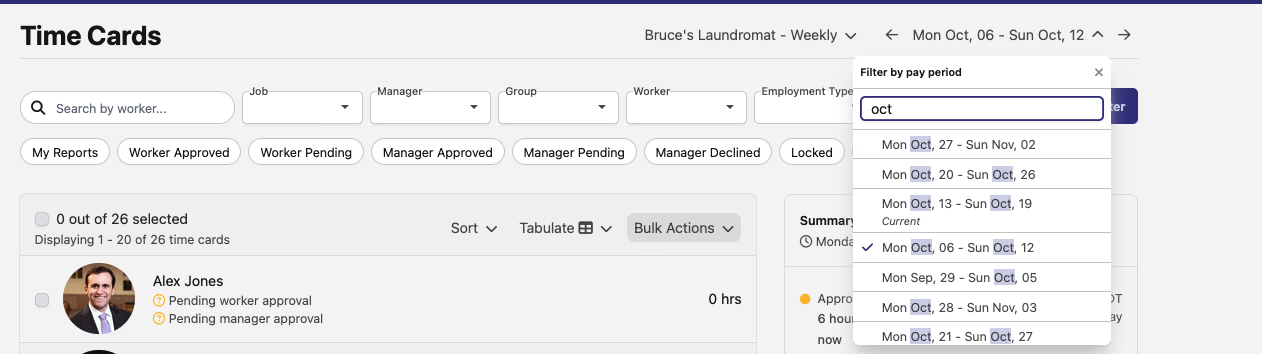
We've completely reimagined how you navigate between pay periods. The new pay period dropdown isn't just a filter anymore—it's now a true navigation tool that helps you jump directly to any pay period you need.
What's New:
- Direct Navigation: Click on any pay period to instantly jump to that period's view—no more waiting for page refreshes or clicking through multiple filters
- Smart Selection: The current pay period is automatically highlighted, so you always know where you are
- Cleaner Interface: The dropdown is now streamlined and faster, making it easier to scan through your pay periods
This might seem like a small change, but we've heard from many of you that navigating between pay periods was taking more clicks than it should. This update cuts that friction significantly.
Better Adjustment Filtering 🎯
Managing payroll adjustments just got more precise. We've added two new filters to the Pay Period Adjustments page that give you better control over what you're looking at:
PWA Compliance Filter: Quickly identify which adjustments are eligible for PWA (Prevailing Wage Act) compliance. This is especially helpful during audit prep or when you need to generate compliance reports—you can now filter to see only the adjustments that matter for your prevailing wage projects.
Job Filter: Need to see adjustments for a specific job? The new job filter lets you narrow down your adjustment view to exactly what you're looking for. Whether you're reviewing a particular project or troubleshooting a payroll issue, this filter helps you focus on the relevant data.
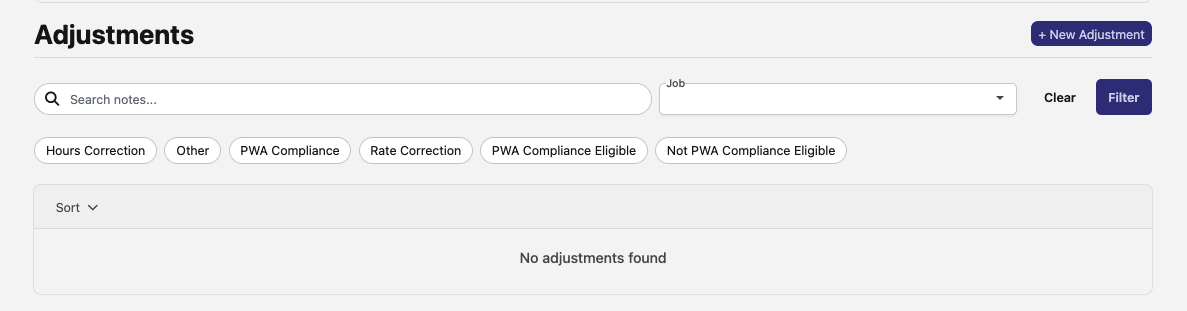
These filters work together, so you can combine them to get super specific—like showing only PWA-eligible adjustments for a particular job. It's all about giving you the precision you need without overwhelming you with information.
Looking Ahead 👀
We're always working on making DSPTCH better for you. These improvements are part of our ongoing commitment to refining the details that matter most in your day-to-day work.
Have feedback on these changes or ideas for what you'd like to see next? We'd love to hear from you—reach out to your account team or send us your thoughts through the in-app feedback tool.
Happy payroll managing! 💪