June 29, 2026 Release Notes

This release sharpens the tools you already use. Trades — the craft groupings behind prevailing-wage and apprenticeship compliance — can now be merged and deleted, worker profiles pick up a Check-Ins tab, and date columns across Tabulate grids switch to a proper date-picker filter. There's also a fresh round of REST API surface for pay schedules, payroll plans, and the Atlas map. 🧰
🏗️ Merge and delete trades
The Trades tab in a job or project's prevailing-wage area now lets you tidy up your craft groupings, not just create and rename them. Two new affordances sit alongside the existing rename icon on each trade row.
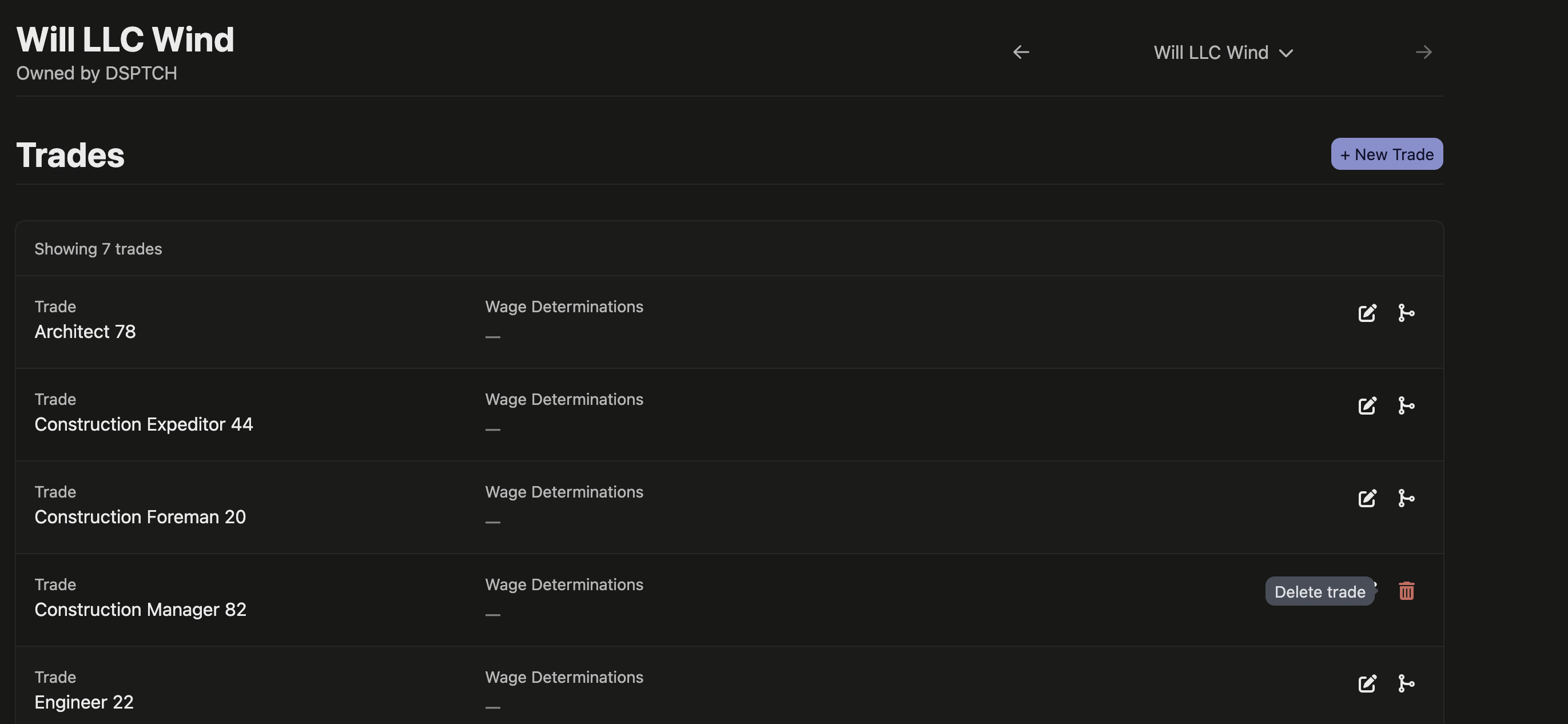
Delete removes a craft grouping you no longer need. The trash icon only appears on trades that are truly empty — ones that don't group any wage determination in any past, present, or future version — so you can never delete a craft that still has work pointed at it.
Merge collapses one craft into another within the same pool. Pick a trade and choose a target from the search box, and every wage determination grouped under the source moves to the target, the now-empty source is removed, and apprenticeship ratios recalculate once for the affected workers. It's the clean way to fix a duplicate craft — say an "Electrician" and a "Journeyworker Electrician" that should have been one group all along.
Both actions are reserved for the company that owns the compliance pool (the project's lead contractor, or a standalone job's company), matching who can already create and rename trades. On a multi-tier project, a subcontractor can see the shared pool on their own tab but can't restructure it.
📍 Check-ins on the worker profile
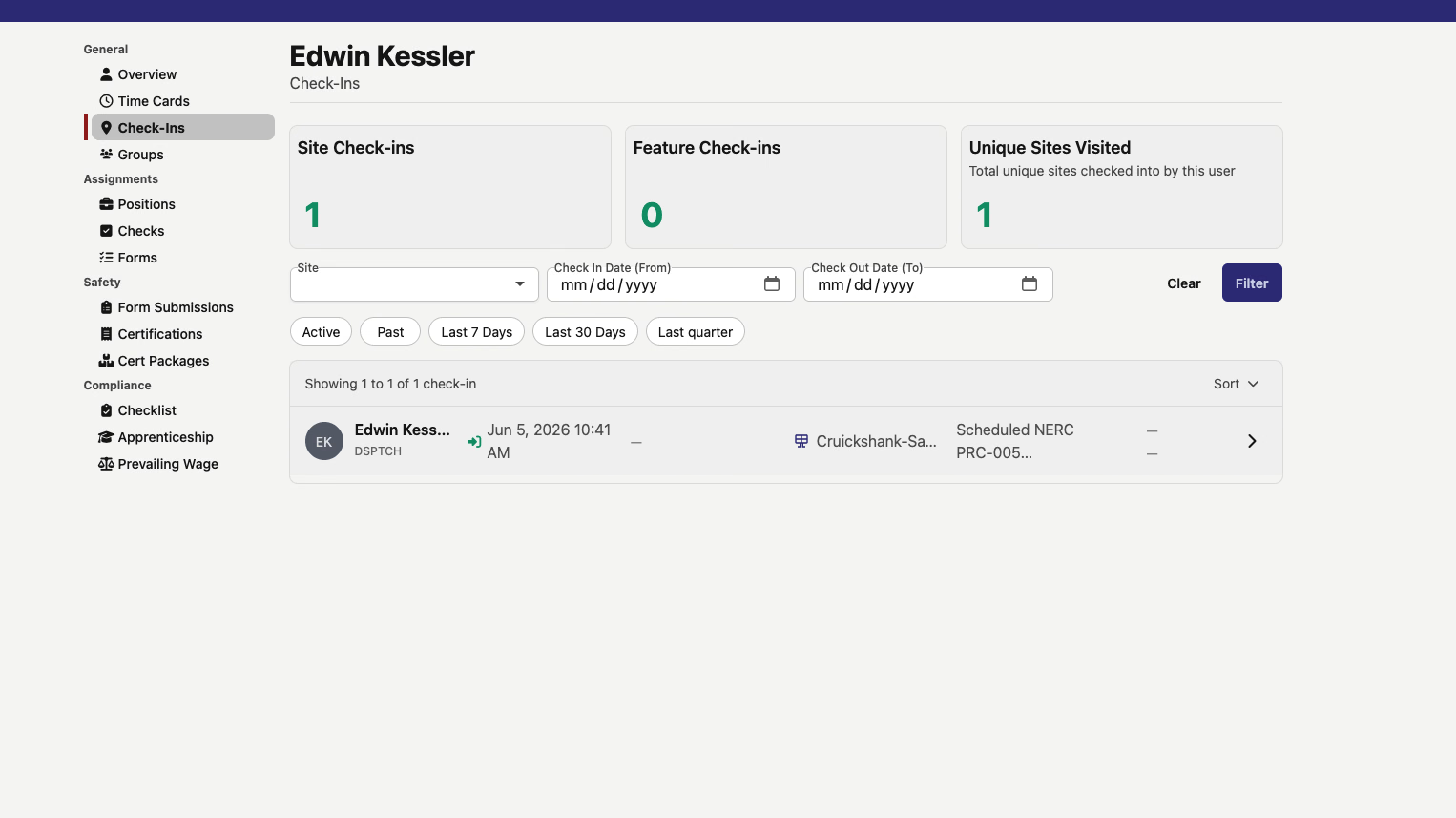
A worker's profile now has a Check-Ins tab that lists every site check-in for that person. Summary cards across the top show their total Site Check-ins, Feature Check-ins, and Unique Sites Visited, and you can narrow the list by site, check-in date, and check-out date, or use the quick filters for Active, Past, Last 7 Days, Last 30 Days, and Last quarter.
The NERC site check-in form also gains an Employer field. When you pick the worker, DSPTCH fills it in automatically from their company — and leaves anything you've typed yourself untouched, so you can always set it by hand.
Field leads can now work in OverSite too: they can open the check-in map, see their company in the site options, and create and edit check-ins, the same as admins, managers, and safety managers already could.
📅 Filter Tabulate grids by date
Date columns across the Tabulate grids now use a real date picker with comparison operators — Equals, Greater than, In range, and so on — instead of a checkbox list of every distinct date. Dates also display in your local format rather than raw ISO strings.
The change reaches the grids where dates matter most: job billing and daily time cards, apprenticeship compliance and penalties, prevailing-wage time cards, the LCP tracker, the jobs index, asset items, apprenticeships, company users, job positions, and the date questions on form-submission grids. Pick a range and the grid filters to it.
On the Job Time page, the two Tabulate buttons are also relabeled for clarity: Tabulate Time Entries opens the per-entry grid, and Tabulate Daily Time opens the daily grid.
🏷️ "Feature" replaces "Asset" in time allocation
Allocating time to the things on a job site now consistently says Feature instead of Asset, matching the per-feature time tracking introduced last release. The relabel covers the time-entry form for single and bulk entries — search placeholders, the grouping labels, and the "No feature for this entry" checkbox — along with grid column headers, CSV export labels, and the validation messages you'd see when a feature is required or missing.
🔌 API additions
- Atlas — list the features on a map site (
GET /api/v1/atlas/sites/:site_id/features) and read a single one — the turbines, arrays, substations, and met towers located on a site, withfilter[type]pluscreated_at/updated_atfilters. - Jobs — read and set a job's feature-allocation rules: whether it tracks feature allocations, requires one per time entry, and caps at one. Clients can now configure this directly instead of discovering it from a
422. - Pay schedules — list your company's pay schedules and read one by its stable id, including its cadence, time zone, and payroll settings. Each schedule's shift-attestation questions are exposed under it as well.
- Time cards — read a time card's imported-payroll actuals: the full pay breakdown (gross/net, taxes, deductions, employer contributions, cash fringe) for workers paid through the Wage & Hour import who don't have paystubs.
- Payroll — list and read fringe benefit plans by company or pay schedule, with name, plan number, funding status, benefit category, and the Illinois certified-payroll fund fields.
- Time entries — the time-entry response renames its
assetsarray of allocated features tofeatures(thefeature_idsarray is unchanged), bringing the API in line with the rest of the app.
🛠️ Fixes
- Pending time-approval reminders now count and list the right time cards for each manager, and the email and in-app notifications link straight to the pay period with the pending-approval filters already applied.
- PWA details for terminated employees can be edited again — their company stays in the dropdown instead of showing a "must be employed" empty state, so there's no need to reinstate employment, make the edit, and re-terminate.
- The Trades and Details sub-tabs keep the job and project tab switcher in place, instead of bouncing back to the compliance overview.
- Company logos show again in the Asset Tracker company selector on the Items and Products pages, instead of falling back to a generic building icon.
Cleaner trade curation, check-ins on every profile, and date filters that actually pick dates. Let us know what you'd like next!
The DSPTCH Team