June 23, 2026 Release Notes

This release builds on last week's asset service schedules with reminders — your team gets a heads-up when an item's service is coming due or overdue. The job scheduler picks up in-place position editing, and the REST API gains two new resources for apprenticeship program employers and pay-schedule holidays. 🔔
🔔 Asset service reminders
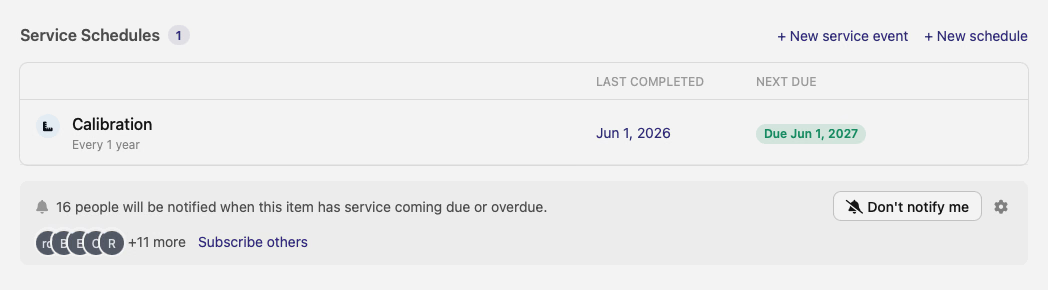
Last release brought recurring service schedules to asset items — maintenance and calibration kept on a cadence, each with a next-due date. This release closes the loop: your team can now be notified when an item's service is coming due or overdue, so a calibration or maintenance date doesn't quietly slip past.
Subscriptions live right in the item's Service Schedules section. A bar shows how many people are watching the item, with a one-click toggle to start or stop your own reminders and a Subscribe others link to bring teammates in. When a schedule's next-due date approaches — or passes — everyone subscribed gets the alert.
📆 Scheduler: edit a position on the timeline
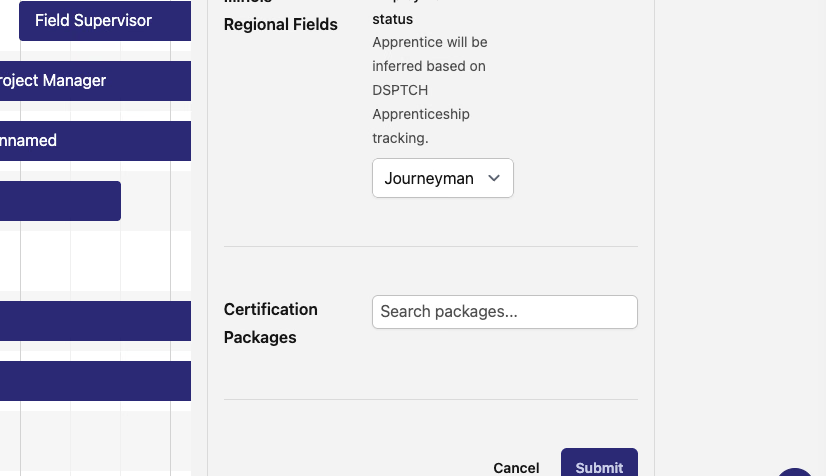
The job scheduler — open it from the Scheduler button on a job's Positions tab — now lets you edit a position without leaving the timeline. Double-click a position bar and a panel opens with its editable details: the position's function, any region-specific fields (like Illinois apprentice status), and its certification packages. Make your changes, submit, and the timeline updates in place.
The assigned worker and scheduled dates aren't changed from this panel — those stay on the timeline itself — so it covers a position's other attributes without the risk of bumping a schedule by accident. The scheduler is still in beta.
🔌 API additions
- Apprenticeship program employers — manage a program's employer roster over the REST API: list, add, update, and remove the companies authorized to employ apprentices in a program, including each employer's Require DSPTCH time card setting. Only the program's sponsor can make changes; enrolled employers can read the roster.
- Pay schedule holidays — read and manage a pay schedule's holiday calendar through the REST API: list, add, update, and remove holidays, including how each one affects overtime and banking. The list can be filtered by those settings.
🛠️ Fixes
- Expected Compliance By Time Card export now reports FLSA-qualified overtime correctly on biweekly pay schedules, not just weekly ones.
Reminders so service dates don't slip, in-place editing on the scheduler, and more of the app reachable over the REST API. Let us know what you'd like next!
The DSPTCH Team