New Features & Improvements - June 4th, 2025
We've been busy making your workday easier with improvements to task management, compliance tracking, and time entry. Here's what's new!
✨ New Features
Task Management Gets Smarter 📋
Set Custom Reminders
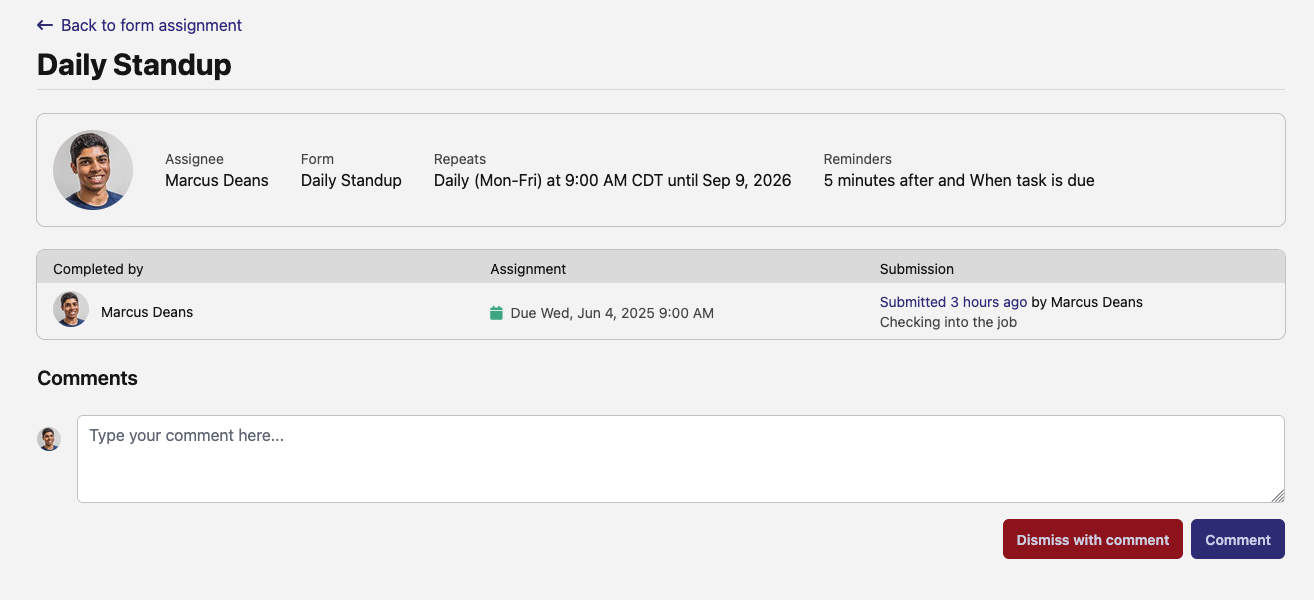
Never miss a deadline again! You can now set reminders for form assignments - choose from quick presets (1 day, 1 hour, 30 minutes before) or create your own schedule. You'll get email notifications at just the right time.
Comments & Task Dismissal
Communication just got easier:
- Add comments to any form assignment to share updates or ask questions
- Dismiss irrelevant tasks with a note explaining why
- Everyone gets notified of changes, keeping the whole team informed
- See all job and safety forms in one streamlined view
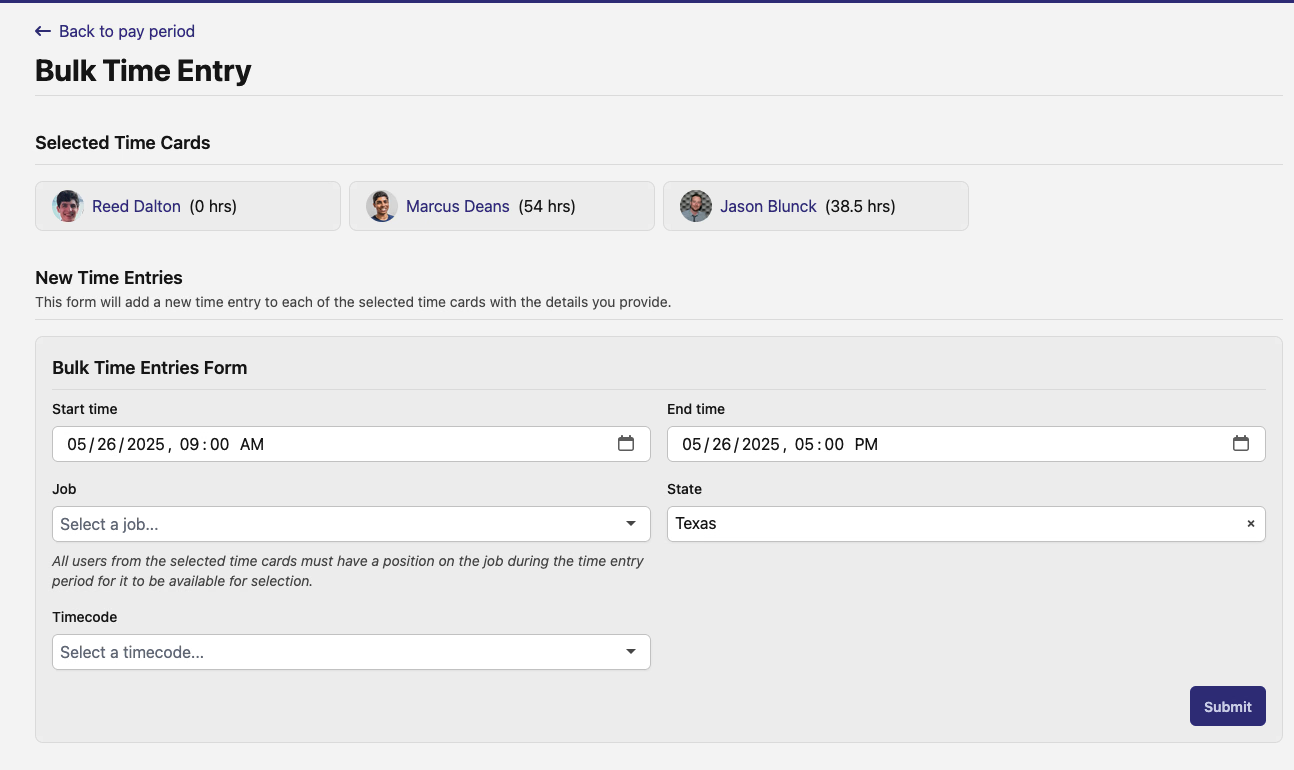
Bulk Time Entry - The Feature You've Been Waiting For! 🎉
Creating time entries for multiple workers is now incredibly fast:
- Select workers using checkboxes on any pay period
- Click "Bulk Actions" → "Create Time Entries"
- Fill out ONE form for everyone
- Done! Time entries created for all selected workers
Perfect for lunch breaks, safety meetings, or any time multiple people did the same thing. The system is smart too - it only shows jobs where all selected workers are assigned.
Time Card Locking 🔒
Payroll Protection is Here! Payroll administrators can now lock time cards to prevent any changes after review. Perfect for protecting finalized payroll data from accidental modifications.
What's New:
- Lock/Unlock Controls: Simple lock icon on each time card - click to toggle protection
- Bulk Operations: Lock or unlock multiple time cards at once from the pay period page
- Smart Filters: Quickly filter to see only locked or unlocked time cards
- Visual Clarity: When a time card is locked, workers see grayed-out buttons with tooltips explaining why they can't make changes
No more accidental changes after payroll review! Lock time cards when they're approved and ready for processing. Workers get clear visual feedback when their time card is finalized, reducing confusion and support tickets. This feature gives payroll teams the control they've been asking for while keeping the interface intuitive for everyone.
Better Compliance Tracking ✅
Clear Compliance Checks
We replaced confusing "warnings" with specific checks that tell you exactly what's wrong: Each check shows ✅ passed, ❌ failed, or ➖ not applicable - no more guessing! Additional checks, including for PWA requirements, have also been added.

Time Entry Import (Beta) 📥
Import time entries directly from CSV files and external systems. Great for companies already tracking time in spreadsheets! This feature is rolling out to select customers.
Enhanced Prevailing Wage Support 💰
Separate PWA and Non-PWA Pay Rates
Major Change Alert! PWA positions now support two different hourly rates - one for prevailing wage work and one for regular work. This means workers on PWA jobs will automatically get paid the correct rate based on whether they're doing PWA-eligible work (construction, installation) or non-PWA time (mobilization, R&R).
What's New:
- Regular Hourly Rate: Applied to non-PWA hours like breaks, meetings, and administrative tasks
- PWA Wage Pay Rate: Applied only to PWA-eligible work hours, ensuring prevailing wage compliance
- Wage adders (hazard pay, shift differentials) now only apply to PWA hours, not break time
- Your existing PWA positions have been automatically updated with both rates
No more overpaying for lunch breaks or underpaying for prevailing wage work! The system now handles mixed work days correctly, ensuring accurate pay while maintaining compliance. Review your PWA positions to ensure both rates look correct - this change will affect your next payroll run.

Regional Wage Determinations
Contractors can now set both federal and regional wage determinations on positions. Everything tracks and reports properly, and both types copy correctly when duplicating jobs. Regional prevailing wage functionality to support state-specific programs can now be selected on the job.
Apprenticeship Tracking
Apprenticeship hours tracking got a massive overhaul for both jobs and projects: Our apprenticeship charts got a complete makeover! The new system loads way faster, updates in real-time when you change date ranges, and works better on mobile. For projects, you can now see compliance broken down by each company - instantly spot who's meeting requirements (green) and who needs attention (red). The rebuilt calculation engine ensures accurate tracking, and the new visualizations make it crystal clear how you're trending toward your apprenticeship goals. No more squinting at confusing charts!
Job Penalties Breakdown
Click "View full daily breakdown" on any penalties page to see day-by-day labor hours and ratio penalties. Detailed breakdowns are included by type and date to get the specific information needed to rectify errors.
Document Signing Made Easy 📝
DocuSeal documents now automatically handle multiple signers. When compliance docs need signatures from several people, we coordinate everything for you - no more manual back-and-forth!
🛠️ Improvements
Faster, Better Maps 🗺️
Maps load much faster, and sites use enhanced color coding for easier identification at a glance.
Smarter Job Templates
Creating jobs from templates works more reliably, especially when copying positions and wage determinations.
Quick Filtering
New "My Reports" filter shows only time cards for the team you manage - find your reports instantly!
Improved Job Address Integration
Jobs can now have their address directly entered on the form, allowing better location tracking.
PWA Enhancements
- Biweekly pay period support for exports
- Better wage rate tracking
- Clearer compliance requirements
What's Next? 🔮
We're working on expanding time entry imports and adding more compliance tools. Stay tuned!
Questions or feedback? Our support team would love to hear from you.
The DSPTCH Team