September 3, 2025 Release Notes

This is a large release across three concurrent areas: projects gain a full subsidiary hierarchy, PWA companies get a structured onboarding checklist, and attestation statements are now configurable per pay schedule — plus regional prevailing wage tracking goes live across time cards, job pay, and the compliance page.
🏗️ Project hierarchy
Projects can now have parent projects. The new Subsidiaries tab on any project displays the full tree: sub-projects, their jobs, and any participating companies that haven't added a project or job yet — all in a single collapsible view with Apprentice Labor Hour % and Backpay Owed rolled up at each level.
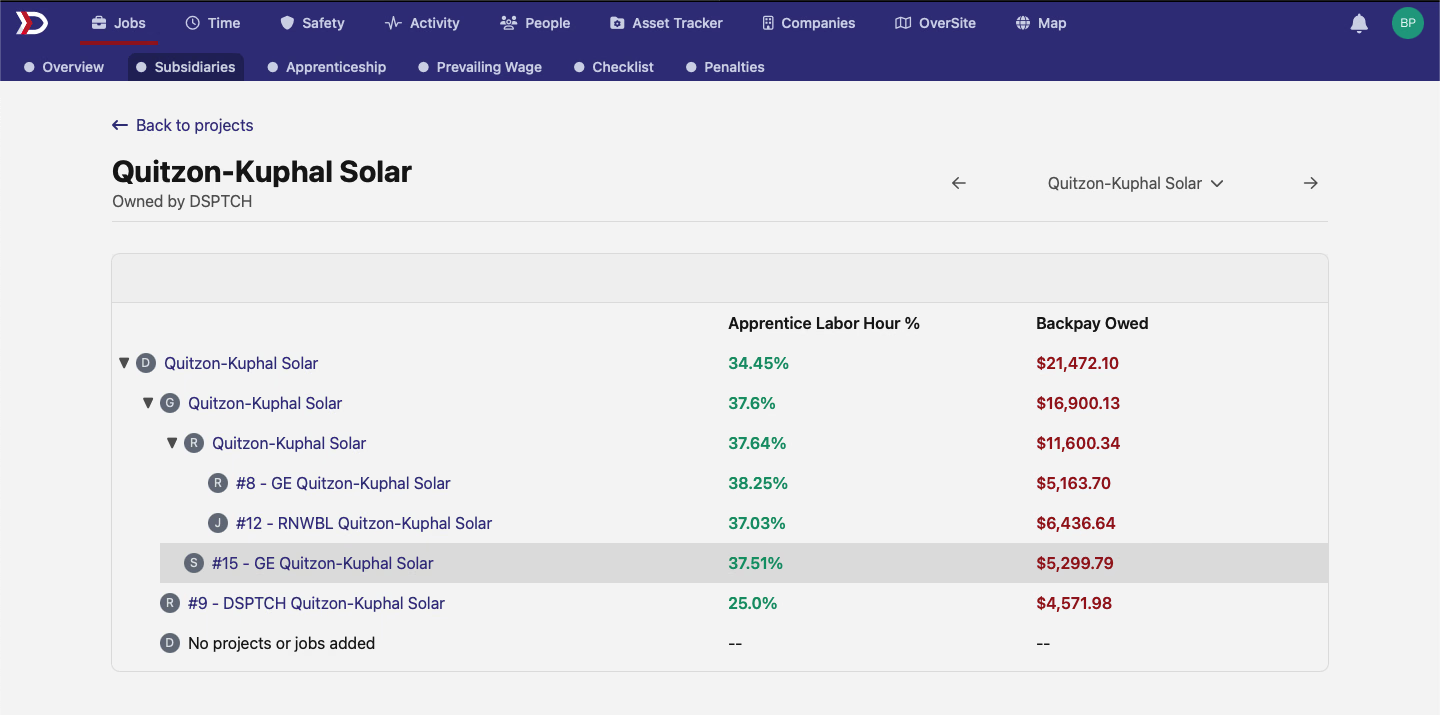
When you assign a parent to a project, the parent's tabs — Apprenticeship, Prevailing Wage, Checklist, Penalties — roll up to cover all descendant jobs, not just the project's direct children. Project owners see the full descendant tree; participating companies see only the projects and jobs where they appear as a participant.
✅ Company onboarding
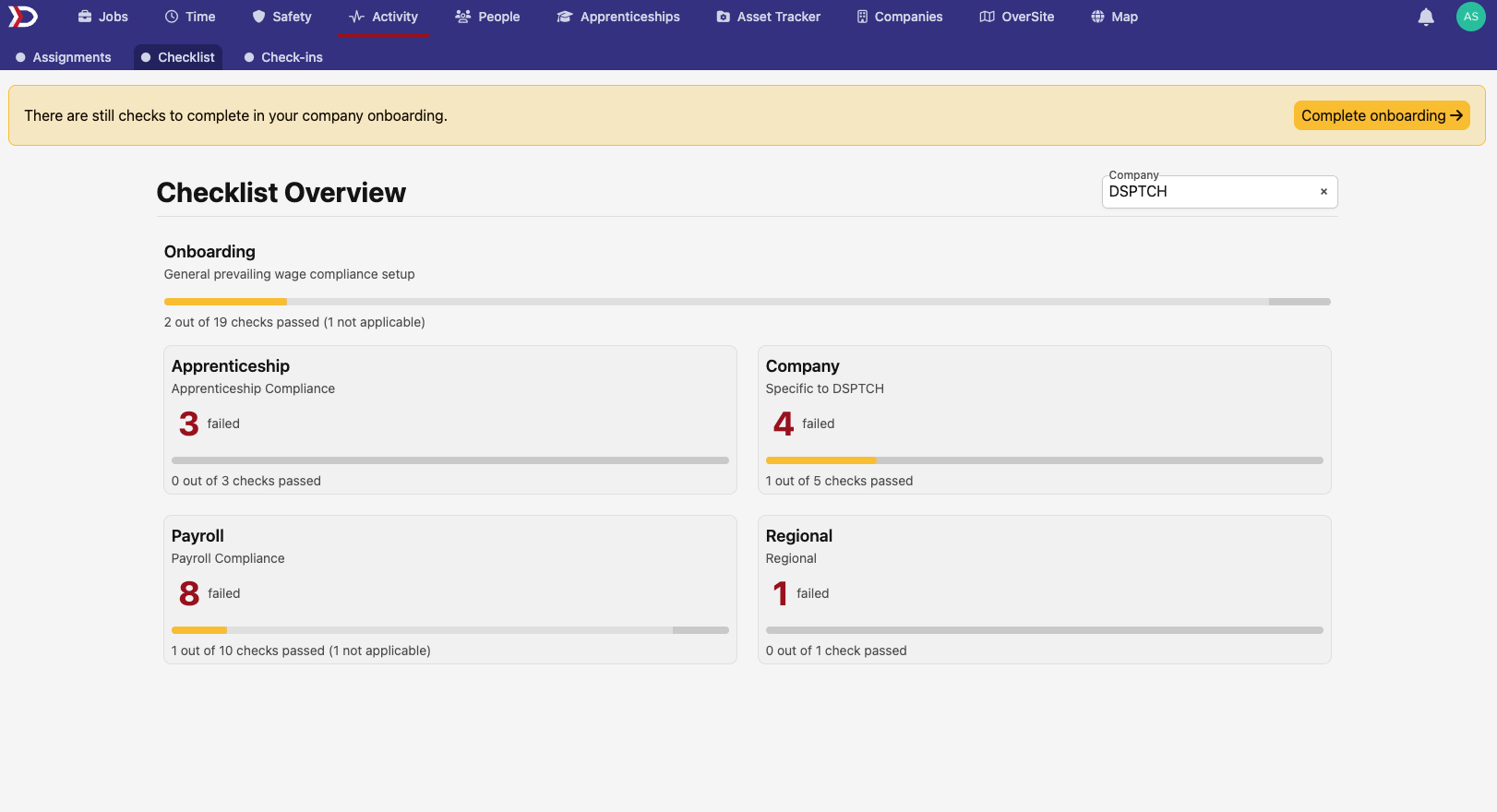
For companies with prevailing wage enabled, a new Onboarding section appears on the Activity → Checklist page. It groups setup requirements into four categories — Apprenticeship, Company, Payroll, and Regional — and shows pass/fail counts with a progress bar for each. When any check is outstanding, a banner appears at the top of the Checklist page with a Complete onboarding link.

The checks cover whether an apprenticeship program exists, whether occupations and wage progression schedules are configured, whether operating regions are set, and whether a payroll integration is connected. Each check links directly to the place in DSPTCH where you can resolve it.
📋 Attestation settings
Time → Settings now includes an Attestation Statements section under each pay schedule. Admins can create statements that workers must respond to when submitting time entries — with a question, an expected response (Yes or No), and a required starting date.
When attestations are configured, each time entry shows the worker's response inline. Time card headers gain an attestation summary: how many entries have a response, how many are missing one, and whether any responses don't match the expected value — flagged in amber for easy review.
The Attestation Statements list shows all configured statements with their expected response and starting date.
💰 Regional PWA
Jobs with a regional prevailing wage determination can now track regional obligations alongside federal ones. The change surfaces across three pages:
Job Pay — The pay summary table and chart now show separate Federal PWA and Regional PWA rows when both apply. Each row carries its own Obligation, Expected Earnings, Cash in Lieu of Fringe, and Outstanding amounts. The chart uses distinct color series for federal vs. regional data, so you can see compliance at a glance for jobs covered by both.
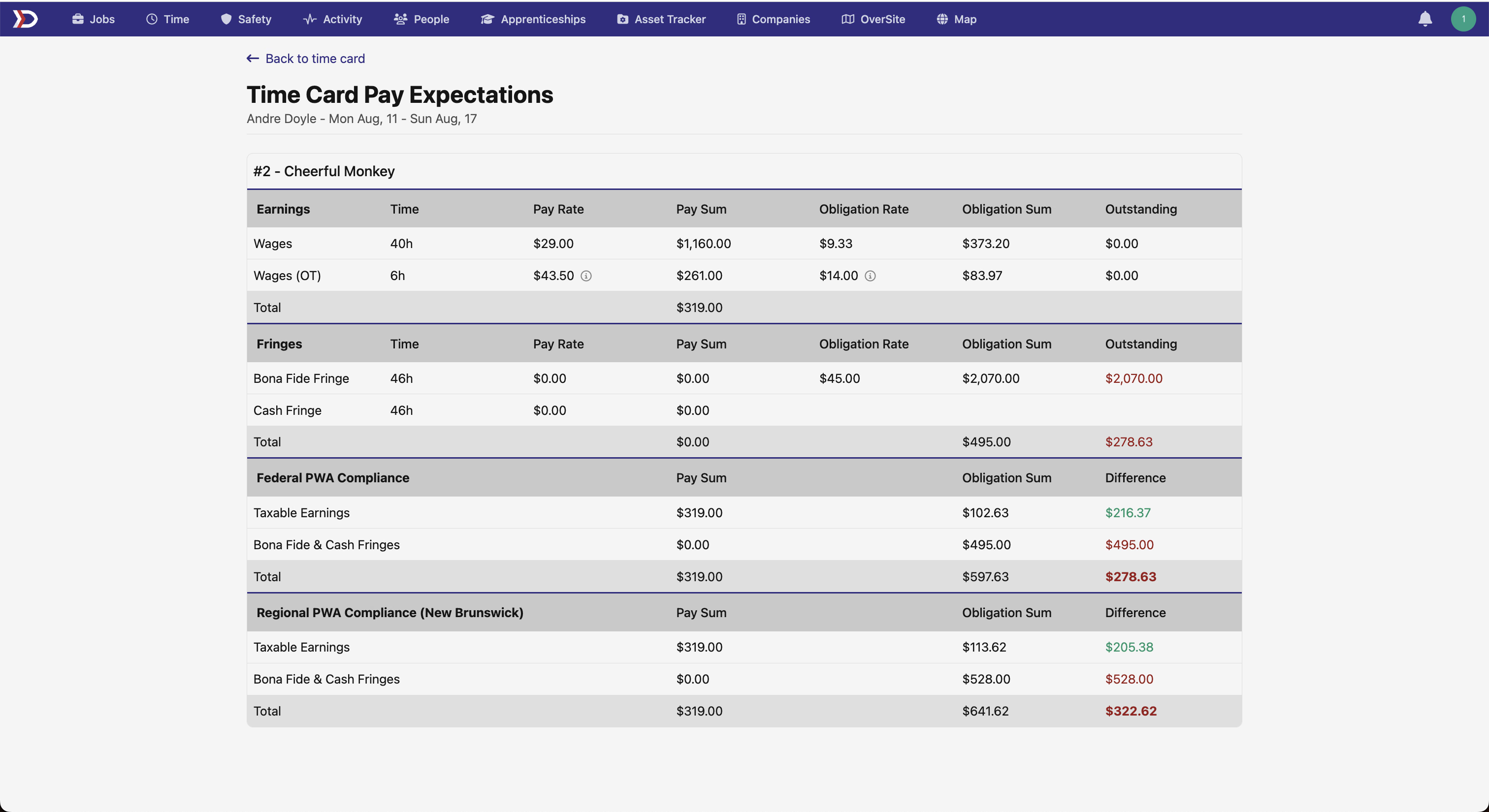
Time Card Pay Expectations — The expectations breakdown now includes a Regional PWA Compliance section alongside Federal. It shows Earnings, Fringes, and an Outstanding total with the same structure as the federal rows, so you can compare the two side by side.
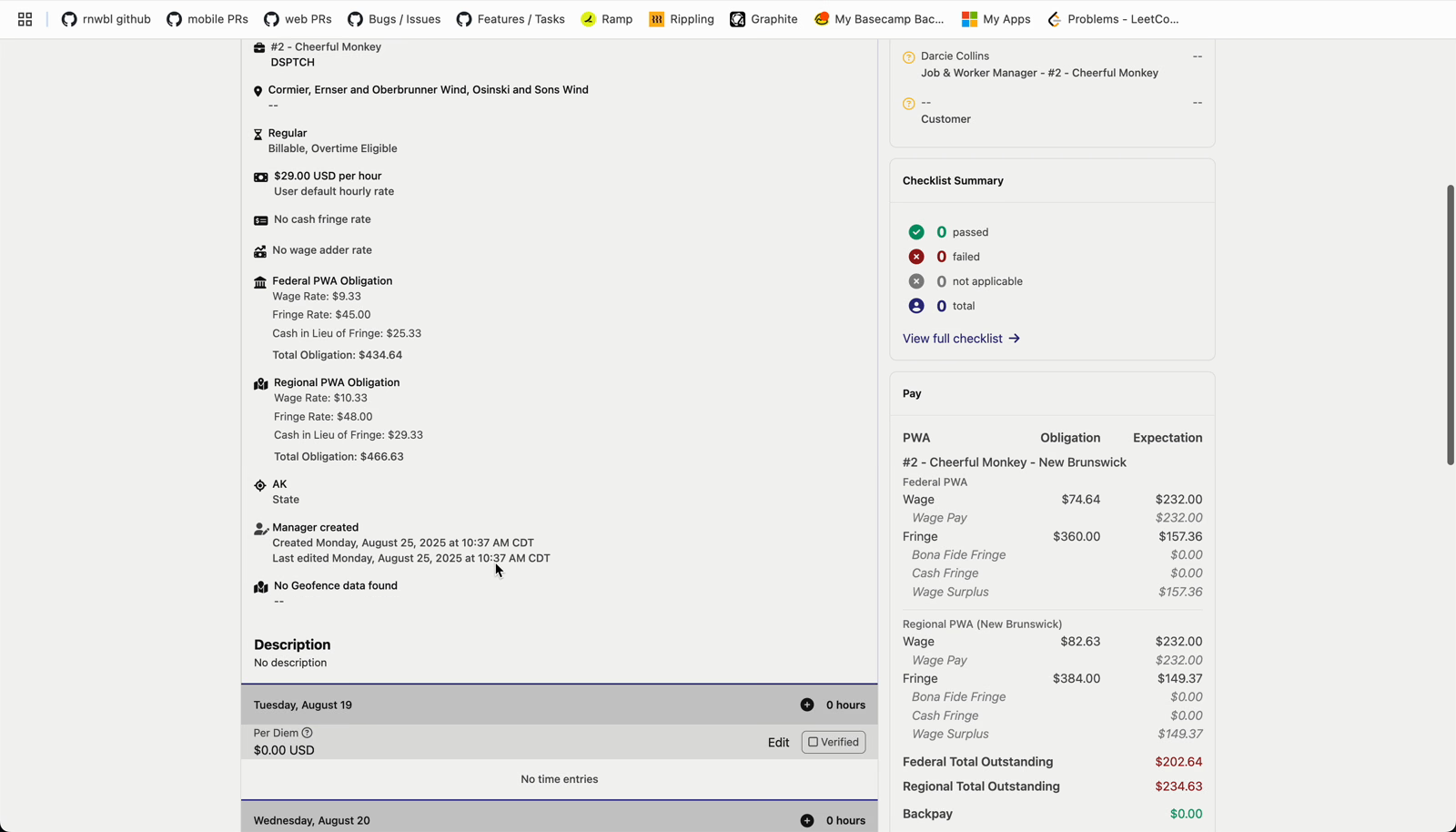
Time entry details — Each time entry now includes a Federal PWA Obligation and Regional PWA Obligation block showing wage rate, fringe rate, cash in lieu rate, and total obligation for each. When a time entry is PWA-eligible but no obligation has been defined yet, the block shows a status message rather than blank rows.
The PWA Compliance tab on time cards has also been updated to show both federal and regional wage rates and earnings side by side, using the higher of the two for compliance calculations.
📝 Illinois certified payroll fields on jobs
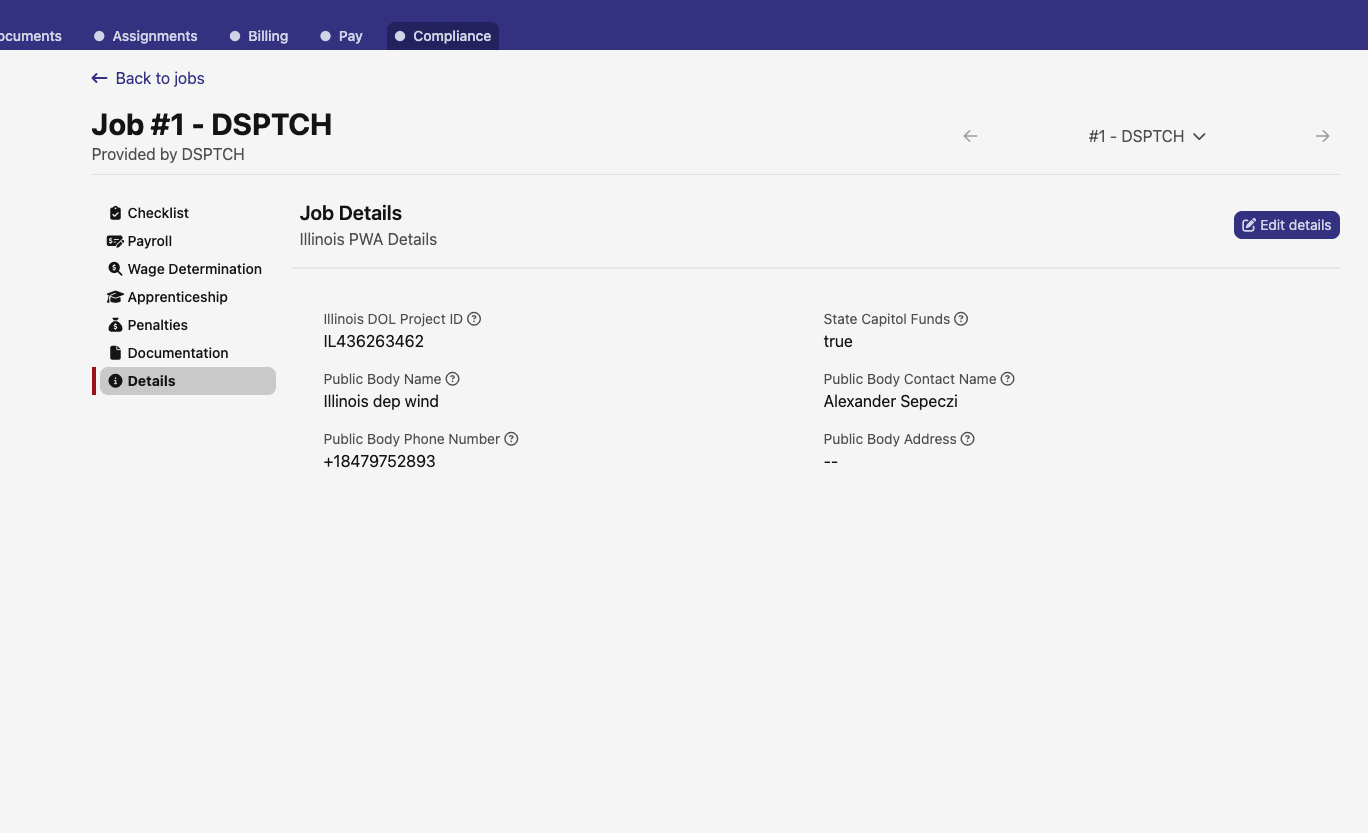
Jobs in an Illinois operating region gain a Illinois PWA Details section under Job Details. It captures Illinois DOL Project ID, State Capitol Funds flag, Public Body Name, Public Body Contact Name, Public Body Phone Number, and Public Body Address — fields required for Illinois certified payroll exports.
🧾 Paystub check numbers
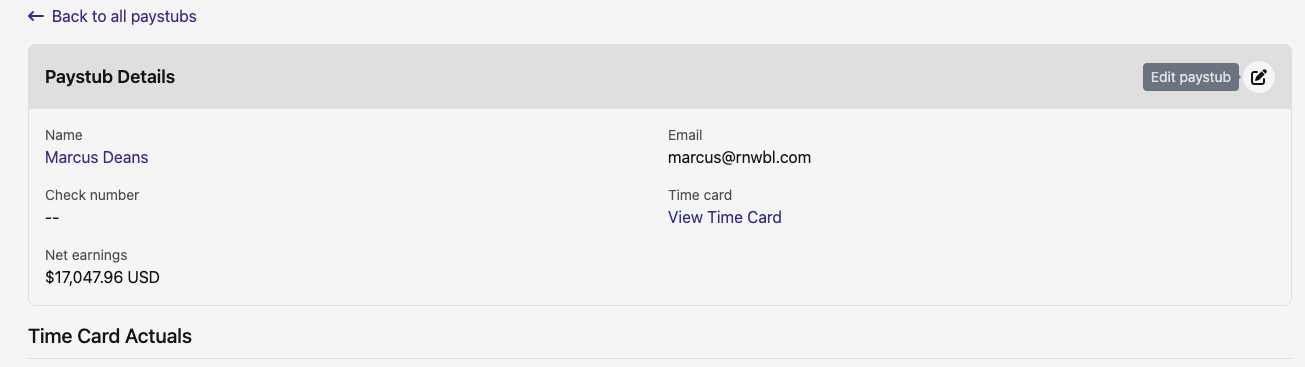
Paystub records can now be edited to add a check number. An Edit paystub button appears on the Paystub Details page, opening an inline form with a single check number field. The check number is required for California eCPR exports.
🛠️ Fixes
- Compliance checklist picks up a sort dropdown — sort by due date or requirement title
- Map popups gain a Back to Top button in the popup header that scrolls back to the top of a long popup without closing it
- Regional PWA time card — the state shown alongside a time entry now displays the full state name instead of the two-letter abbreviation
- California regional PWA — 7th consecutive day overtime premium now applies only on the actual 7th consecutive day, not on earlier days in the week
- Job regional PWA details link now appears correctly when a job has no PWA mode set, rather than being silently absent
As always, reach out if you have any questions.
The DSPTCH Team