February 5, 2026 Release Notes
We're excited to share some solid improvements that make your import workflows more transparent, enhance form usability, and deliver several interface refinements throughout DSPTCH! This release brings better visibility into payroll imports, new UI components, and important fixes for time tracking. 📋
📊 Enhanced Paystub Import Experience
New Import Preview Interface
Paystub imports now feature a comprehensive preview screen that gives you complete visibility into what's being imported before final confirmation.
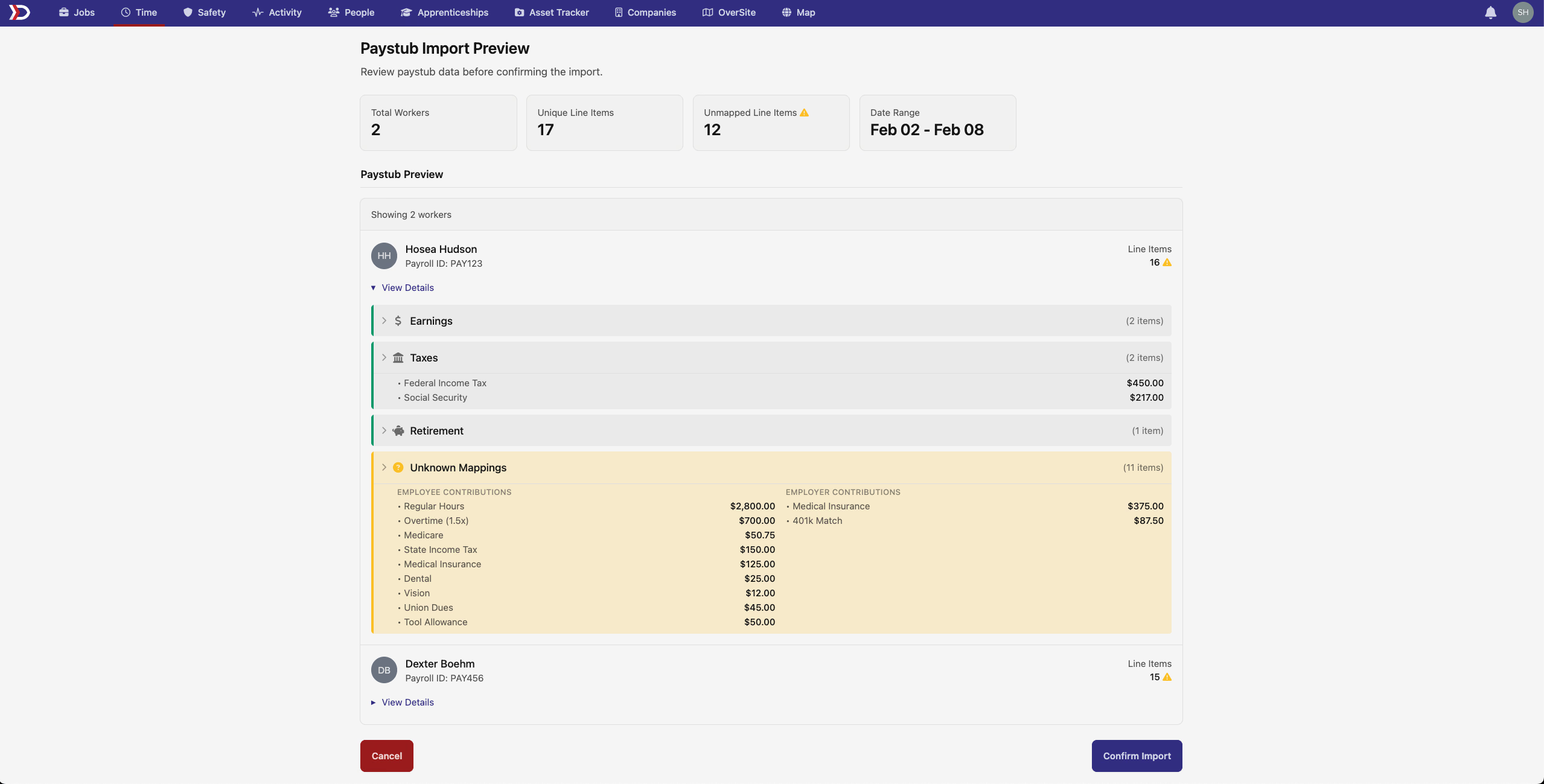
The new preview system includes:
- Per-User Breakdown - Clear display of import data organized by employee
- Expandable Line Items - Detailed view of earnings, taxes, health, retirement, insurance, garnishments, and other deductions
- Unknown Item Highlighting - Unmapped items are clearly marked and can be configured in Pay Schedules Integrations after import
- Category Grouping - Line items are logically organized by type for easier review
- Pre-Import Validation - Catch and resolve issues before they affect your payroll data
This enhancement gives payroll teams the confidence and control they need when importing complex paystub data.
⏰ Time Entry Form Improvements
Reliable Rate Handling
Time entry rate updates now are less aggressive in their auto-updating. Now, when a time entry form is opened, rates will not update unexpectedly or unnecessarily.
The improvement ensures:
- Predictable Behavior - Custom rates no longer auto-populate with expected rates when forms open
- Clear User Control - Rate changes only happen through deliberate user actions
- Reduced Confusion - Eliminates unexpected rate changes that weren't apparent to users
These updates continue our focus on making everyday workflows more reliable and transparent. The new paystub preview functionality will be especially valuable for payroll teams managing complex import processes, while the form and interface improvements enhance the daily user experience throughout DSPTCH.
As always, our team is here to help if you have any questions about these new features!
The DSPTCH Team